
Usage Guide
Quick Reference
| Command | Purpose | Example |
|---|---|---|
sley init | Initialize project with .version | sley init --migrate |
sley discover | Auto-discover version sources | sley discover --format json |
sley show | Display current version | sley show --all |
sley set | Set version manually | sley set 2.0.0 --pre beta |
sley bump | Increment version | sley bump patch |
sley bump pre | Increment pre-release | sley bump pre --label beta |
sley bump auto | Smart version bump | sley bump auto |
sley bump release | Remove pre-release | sley bump release |
sley pre | Set pre-release label | sley pre --label alpha --inc |
sley validate | Validate .version file | sley validate --strict |
sley doctor | Validate config and version | sley doctor --all |
sley tag | Manage git tags | sley tag create --push |
sley changelog | Manage changelogs | sley changelog merge |
Project Setup
Initialize Project
Interactive Mode
Run sley init without flags to launch the interactive TUI where you can select which plugins to enable:
sley init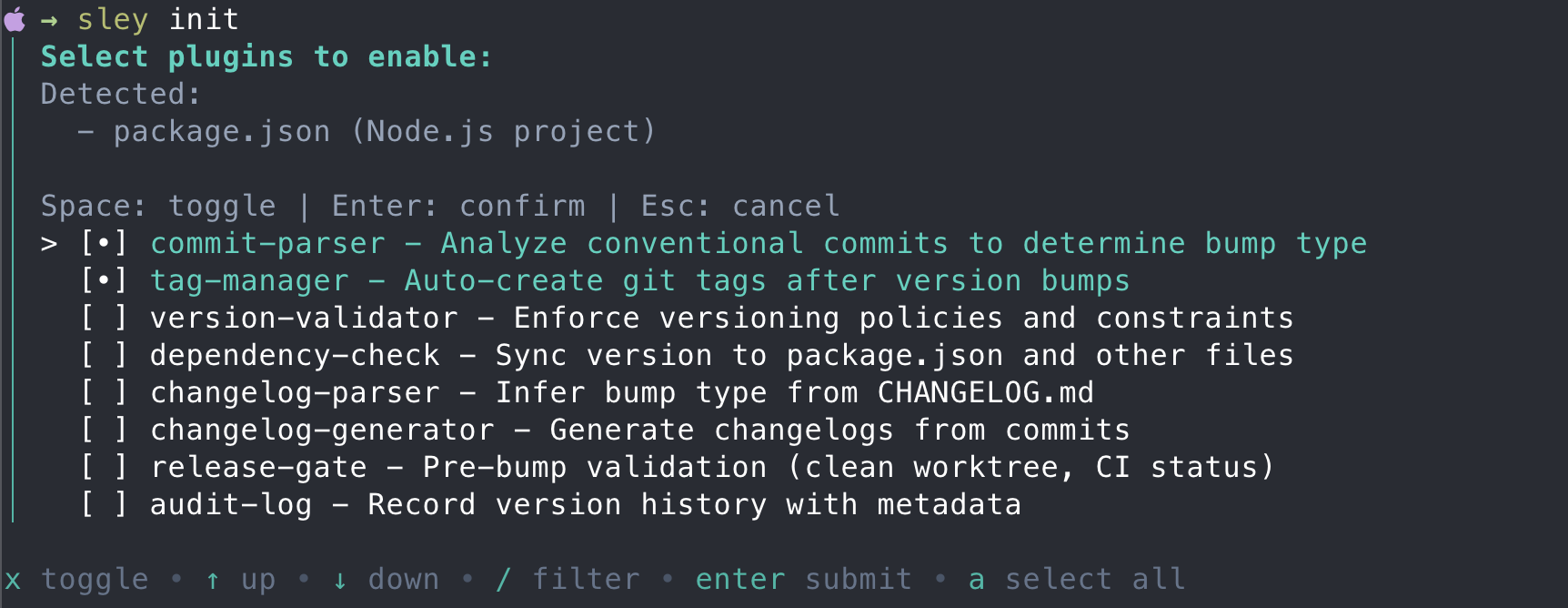
Use the keyboard to navigate and select plugins:
- Space / x: Toggle selection
- Arrow keys: Navigate up/down
- /: Filter plugins
- Enter: Confirm selection
- a: Select all
- n: Select none
- Esc: Cancel
Non-Interactive Mode
For CI/CD pipelines or scripted setups, use the --yes flag to skip prompts:
# Use sensible defaults (commit-parser, tag-manager)
sley init --yes
# Output:
#   Created .version with version 0.0.0
#   Created .sley.yaml with default plugins (commit-parser, tag-manager)

# Use a pre-configured template
sley init --template automation

# Enable specific plugins
sley init --enable commit-parser,tag-manager,changelog-generator

# Initialize as monorepo with workspace configuration
sley init --workspace --yes

# Force overwrite existing configuration
sley init --yes --force
Migrate from Existing Version
If your project already has a version defined in package.json, Cargo.toml, or similar files, use --migrate to detect and import it:
sley init --migrate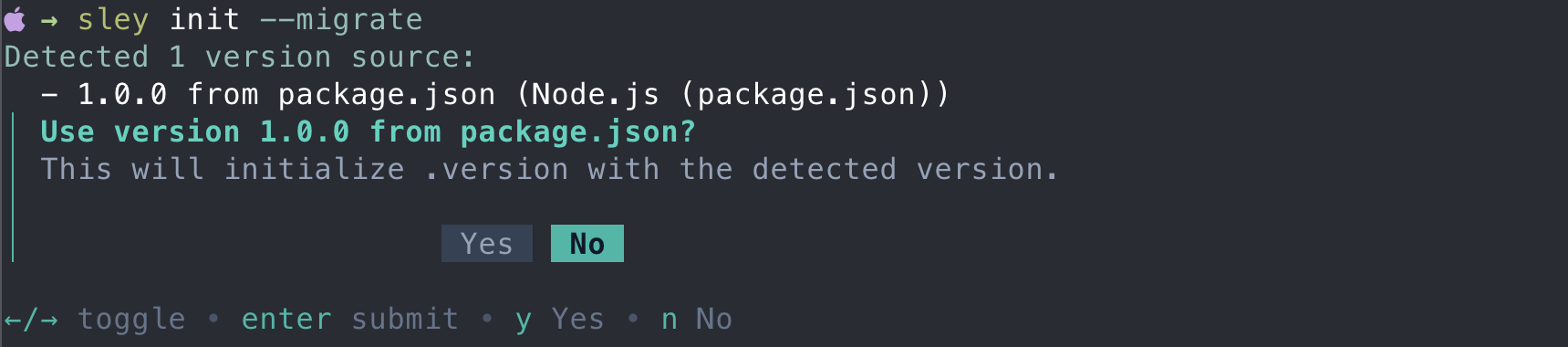
The migration feature will scan for version sources and prompt you to confirm before creating the .version file.
# Skip confirmation prompt
sley init --migrate --yes
Available Flags
| Flag | Description |
|---|---|
--yes, -y | Use defaults without prompts (commit-parser, tag-manager) |
--template | Use a pre-configured template |
--enable | Comma-separated list of plugins to enable |
--workspace | Initialize as monorepo with workspace configuration |
--migrate | Detect version from existing files (package.json, etc.) |
--force | Overwrite existing .sley.yaml |
--path, -p | Custom path for .version file |
Available Templates
| Template | Plugins Enabled |
|---|---|
basic | commit-parser |
git | commit-parser, tag-manager |
automation | commit-parser, tag-manager, changelog-generator |
strict | commit-parser, tag-manager, version-validator, release-gate |
full | All plugins enabled |
Auto-Discover Version Sources
If your project already has versions in manifest files (package.json, Cargo.toml, pyproject.toml, etc.), discover provides an interactive workflow to scan and initialize:
sley discoverThe command will:
- Scan for
.versionfiles and manifest files in your project tree - Display what it found
- Ask if you want to initialize
- Let you select which files to keep in sync
- Create
.versionand.sley.yamlwithdependency-checkpre-configured
Useful for migrating existing projects or setting up monorepos with multiple version sources.
See CLI Reference: discover for all options.
Version Operations
Display Current Version
# Single-root: Display current version
sley show
# Output: 1.2.3

# Fail if .version is missing (strict mode)
sley show --strict
# Output: Error: version file not found at .version
Multi-Module Projects
# Show all module versions
sley show --all
# Output:
#   ✓ root (.version): 1.0.0
#   ✓ web (apps/web/.version): 0.5.0-beta.1
#   ✓ core (packages/core/.version): 3.2.1
#   ✓ utils (packages/utils/.version): 2.0.0

# Show specific module version
sley show --module core
# Output: 3.2.1

# JSON output for CI/CD
sley show --all --format json
# Output: [{"name":"root","path":".version","version":"1.0.0"},...]

# Table format
sley show --all --format table
# ┌──────┬─────────────────────┬──────────┐
# │ Name │ Path                │ Version  │
# ├──────┼─────────────────────┼──────────┤
# │ root │ .version            │ 1.0.0    │
# │ web  │ apps/web/.version   │ 0.5.0    │
# └──────┴─────────────────────┴──────────┘
See Monorepo Workflows for detailed examples across different versioning models.
Set Version Manually
# Single-root: Set version
sley set 2.1.0
# Output: .version is now 2.1.0

# Set pre-release version
sley set 2.1.0 --pre beta.1
# Output: .version is now 2.1.0-beta.1

# Attach build metadata
sley set 1.0.0 --meta ci.001
# Output: .version is now 1.0.0+ci.001

# Combine pre-release and metadata
sley set 1.0.0 --pre alpha --meta build.42
# Output: .version is now 1.0.0-alpha+build.42
Multi-Module Projects
# Coordinated versioning: Set all modules to same version
sley set 2.1.0 --all
# Output:
# Set version to 2.1.0
#   ✓ coordinated-versioning (.version): 2.0.0 -> 2.1.0
#   ✓ api (services/api/.version): 2.0.0 -> 2.1.0
#   ✓ web (services/web/.version): 2.0.0 -> 2.1.0

# Independent versioning: Set specific module version
sley set 4.0.0 --module core
# Output:
#   ✓ core (packages/core/.version): 3.2.1 -> 4.0.0

# Set all modules to same version (rare in independent versioning)
sley set 1.0.0 --all
# Output:
#   ✓ root (.version): 1.0.0 -> 1.0.0
#   ✓ web (apps/web/.version): 0.5.0-beta.1 -> 1.0.0
#   ✓ core (packages/core/.version): 3.2.1 -> 1.0.0
#   ✓ utils (packages/utils/.version): 2.0.0 -> 1.0.0
See Monorepo Workflows for detailed examples across different versioning models.
Bump Version
# Current: 1.2.3

sley bump patch
# Output: 1.2.4

sley bump minor
# Output: 1.3.0

sley bump major
# Output: 2.0.0

# Remove pre-release and metadata
# Current: 1.3.0-alpha.1+build.123
sley bump release
# Output: 1.3.0
Increment Pre-release
Increment only the pre-release portion without bumping the version number:
# Current: 1.0.0-rc.1
sley bump pre
# Output: 1.0.0-rc.2

# Current: 1.0.0-rc1
sley bump pre
# Output: 1.0.0-rc2

# Switch to a different pre-release label
# Current: 1.0.0-alpha.3
sley bump pre --label beta
# Output: 1.0.0-beta.1
Multi-Module Pre-release Bumps
The bump pre command supports multi-module operations:
# Bump pre-release for all modules
sley bump pre --all
sley bump pre --all --label beta

# Bump pre-release for specific module
sley bump pre --module api
sley bump pre --module web --label rc
You can also pass --pre and/or --meta flags to any bump:
sley bump patch --pre beta.1
# Output: 1.2.4-beta.1

sley bump minor --meta ci.123
# Output: 1.3.0+ci.123

sley bump major --pre rc.1 --meta build.7
# Output: 2.0.0-rc.1+build.7

# Skip pre-release hooks and extensions during bump
sley bump patch --skip-hooks
# Output: 1.2.4 (no hooks executed)
TIP
By default, any existing build metadata (the part after +) is cleared when bumping the version.
To preserve existing metadata, pass the --preserve-meta flag:
# Current: 1.2.3+build.789
sley bump patch --preserve-meta
# Output: 1.2.4+build.789

# Current: 1.2.3+build.789
sley bump patch --meta new.build
# Output: 1.2.4+new.build (overrides existing metadata)
Smart Bump Logic
Automatically determine the next version:
# Current: 1.2.3-alpha.1
sley bump auto
# Output: 1.2.3

# Current: 1.2.3
sley bump auto
# Output: 1.2.4
Override bump with --label:
sley bump auto --label minor
# Output: 1.3.0

sley bump auto --label major --meta ci.9
# Output: 2.0.0+ci.9

sley bump auto --label patch --preserve-meta
# Output: bumps patch and keeps build metadata
Valid --label values: patch, minor, major.
Set Pre-release Label
The pre command provides explicit control over pre-release labels:
# Current: 1.2.3
sley pre --label alpha
# Output: 1.2.4-alpha (bumps patch first)

# Current: 1.2.3
sley pre --label alpha --inc
# Output: 1.2.3-alpha.1 (no patch bump, adds numeric suffix)

# Current: 1.2.3-alpha.1
sley pre --label alpha --inc
# Output: 1.2.3-alpha.2 (increments counter)

# Switch labels
# Current: 1.2.3-alpha.5
sley pre --label beta --inc
# Output: 1.2.3-beta.1 (new label, counter starts at 1)
See Pre-release Versions for complete guide on pre-release workflows.
Validation
Validate Version File
Check whether the .version file exists and contains a valid semantic version:
# Single-root: Validate version file and configuration
sley validate
# Output: Valid version file at ./<path>/.version

# Use doctor alias (validates config and version file)
sley doctor
# Output:
# Configuration Validation:
#   ✓ [PASS] YAML Syntax
#   ✓ [PASS] Plugin Configuration
#
# Version File Validation:
#   ✓ [PASS] .version exists and is valid (1.2.3)

# If the file is missing or contains an invalid value
sley validate
# Output: Error: invalid version format: ...
Multi-Module Projects
# Validate all modules
sley doctor --all
# Output:
# Configuration Validation:
#   ✓ [PASS] YAML Syntax
#   ✓ [PASS] Plugin Configuration
#
# Validation Summary
#   ✓ root (.version): 1.0.0
#   ✓ web (apps/web/.version): 0.5.0-beta.1
#   ✓ core (packages/core/.version): 3.2.1
#   ✓ utils (packages/utils/.version): 2.0.0

# Validate specific module
sley doctor --module web
# Output:
# Configuration Validation:
#   ✓ [PASS] YAML Syntax
#   ✓ [PASS] Plugin Configuration
#
# Version File Validation:
#   ✓ web (apps/web/.version): 0.5.0-beta.1
See Monorepo Workflows for detailed examples across different versioning models.
Git Integration
Manage Git Tags
sley tag create             # Create tag for current version
sley tag create --push      # Create and push
sley tag create --all       # Tag all modules (skips duplicates, continues on failure)
sley tag create --all --push  # Tag and push all modules
sley tag list               # List version tags
In a workspace with prefix: '{module_path}/v':
sley tag create --all
#   ✓ root: v1.0.0
#   ✓ adapters/redis: adapters/redis/v0.1.0
#   i Skipped kong/v0.2.0 - tag already exists
See Tag Manager for automatic tagging, GPG signing, and configuration options.
Manage Changelogs
sley changelog merge # Merge versioned changelogs into CHANGELOG.mdSee Changelog Generator for automatic changelog generation from commits.
Monorepo Operations
Initialize a Workspace
sley init --workspace --yes
# Detects go.work, pnpm-workspace.yaml, package.json workspaces, or Cargo.toml workspace.
# Creates root .sley.yaml with versioning: independent and prefix: '{module_path}/v'.
# Creates .version files in each discovered submodule directory.
Discover Modules
sley discover
sley discover --format json    # Machine-readable output
sley discover --format table   # Structured table view
In independent versioning mode, version differences between modules are reported as informational rather than warnings.
Bump Across Modules
sley bump patch --all                    # Bump all modules
sley bump patch --module core            # Bump one module
sley bump patch --modules core,api       # Bump named modules
sley bump patch --pattern "packages/*"   # Bump by glob
sley bump patch --all --parallel         # Run in parallel
sley bump patch --all --continue-on-error  # Log errors, keep going
Tag All Modules
sley tag create --all --push
# Skips modules where the tag already exists (info, not fatal).
# Continues if an individual module tag fails.
See Monorepo Support for versioning models and workspace configuration.
Rolling Back a Version Change
# Set back to previous version
sley set 1.2.3

# Git revert (if committed)
git revert HEAD

# Delete tag if created
git tag -d v1.2.4
git push origin :refs/tags/v1.2.4
What's Next?
- Pre-release Versions - Alpha, beta, RC workflows
- Monorepo Support - Multi-module version management
- CI/CD Integration - Automate versioning in pipelines
- CLI Reference - Complete command and flag reference